
Responding to Google Reviews: A Playbook for Your Business
September 25, 2026
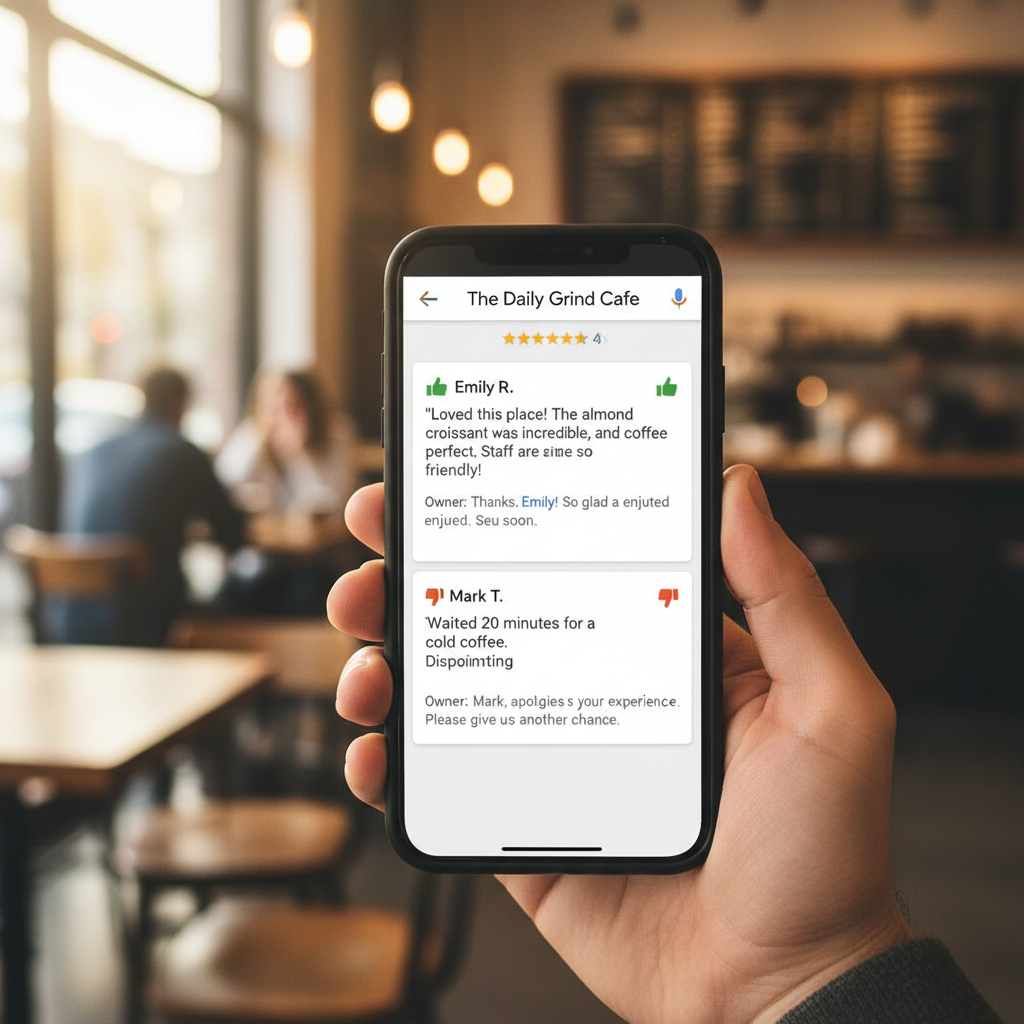
Google reviews are a powerful tool for local businesses like your restaurant, coffee shop, gym, or salon. They influence potential customers and provide direct feedback. How you respond to these reviews shapes your online reputation and shows customers you care. This playbook outlines a practical approach to managing your Google reviews.
Why Every Review Matters for Your Local Business
Think about the last time you searched for a new place to eat or a gym. Chances are, you checked their reviews. High-quality, recent reviews with thoughtful responses signal a business that's engaged and trustworthy. Positive reviews attract new customers, while well-handled negative reviews can demonstrate excellent customer service and turn a critic into a fan.
Responding to reviews also plays a role in your local SEO. Google's algorithms consider engagement and customer feedback as ranking signals. A business that actively manages its reviews often performs better in local search results.
The Essentials of Responding to Positive Reviews
Positive reviews are a gift. They validate your hard work and provide social proof. Don't let them go unnoticed. A simple, sincere response can strengthen customer loyalty and encourage others to share their good experiences.
Here’s how to approach positive feedback:
- Be Timely: Aim to respond within 24-48 hours. This shows you're attentive and appreciate their feedback.
- Thank Them Specifically: Beyond a generic “thank you,” mention something specific from their review. For a restaurant, "We're so glad you enjoyed our new pasta dish and the friendly service!" is better than just "Thanks!"
- Use Your Business Name & Keywords: Naturally weave in your business name and relevant keywords (e.g., "Our coffee shop prides itself..."). This helps reinforce your brand and can benefit your local search presence.
- Invite Them Back: A simple, "We look forward to seeing you again soon!" encourages repeat business.
- Keep it Concise: Positive responses don't need to be long. Authenticity and brevity are key.
Navigating Negative Reviews Gracefully
Negative reviews can be tough, but they're also an opportunity. How you handle criticism can speak volumes about your business's integrity and commitment to customer satisfaction. A thoughtful, professional response can de-escalate situations, show potential customers your dedication, and even turn a negative experience around.
Here’s your action plan for negative feedback:
- Respond Promptly (But Not Rashly): Take a moment to compose yourself. Respond within 24-48 hours, but ensure your reply is calm and professional.
- Apologize & Empathize: Start with a sincere apology for their experience, even if you don't agree with every detail. "We're truly sorry to hear you had this experience at our salon." Show you understand their frustration.
- Acknowledge the Specifics: Address the core issue they raised. This shows you listened. "We understand the wait time for your car service was longer than expected."
- Offer a Solution (Offline): Never argue or make excuses. Instead, offer to resolve the issue directly and privately. Provide a way for them to contact you offline (phone number, email address) to discuss it further. "Please call us directly at [phone number] so we can make this right." This moves the conversation out of the public eye.
- Highlight Your Commitment: Briefly reaffirm your business's standards or values. "We always strive for excellent customer service, and we regret we fell short in this instance."
- Avoid Defensiveness: Your public response is for everyone to see, not just the reviewer. Keep it professional and focused on resolution, not blame.
The Importance of a Complete Online Presence
While managing Google reviews is crucial, it’s only one piece of your overall online visibility. Google Business Profile optimization is key, but don't overlook other platforms. Many local businesses, especially walk-in establishments like restaurants, coffee shops, and gyms, also rely heavily on Apple Maps.
Why Apple Maps Matters for Your Business
Every iPhone user has Apple Maps as their default navigation app. This means a significant portion of "near me" searches, directions requests, and direct calls to businesses originate from Apple Maps, not just Google. If your coffee shop, bakery, or urgent care clinic isn't optimized on Apple Maps, you're missing out on a large segment of potential customers actively looking for local services.
Optimizing Your Apple Maps Listing with Apple Business Connect
Just like your Google Business Profile, your Apple Maps listing needs attention. Apple Business Connect is the platform where you manage your business information on Apple Maps. Here's what to focus on:
- Categories: Select the most accurate and specific categories for your business (e.g., "Italian Restaurant," "Spin Class Gym").
- Photos: Upload high-quality, appealing photos of your exterior, interior, products, and services. First impressions matter.
- Hours of Operation: Ensure your hours, including special holiday hours, are always up-to-date.
- Place Card Details: Verify your address, phone number, website, and other contact information. Add services, amenities, and any special offerings.
- Actions: You can add custom actions like "Order Food" or "Book an Appointment" directly within your place card, making it easier for customers to engage with your business.
Properly optimizing your Apple Maps presence ensures that when an iPhone user searches for a "restaurant near me" or "hair salon" in your area, your business shows up accurately and appealingly.
How Apple Maps Ads Boost Visibility
Even with a perfectly optimized listing, competition is fierce. This is where Apple Maps Ads come in. They allow your business to stand out at the top of search results within Apple Maps.
How they work:
- Pay-Per-Tap (PPT): You only pay when someone taps on your ad.
- Targeted: Ads are targeted by location and category. If someone searches for "pizza" near your pizzeria, your ad can appear.
- Budget Control: You set a monthly budget maximum, so you always control your spending.
- "Ad" Label: Ads are clearly labeled with an "Ad" tag, maintaining transparency for users.
Apple Maps Ads complement your organic visibility efforts on both Apple Maps and Google. They provide an immediate boost, getting your business in front of customers at the exact moment they're looking for what you offer, often with intent to visit or buy. Combined with a strong strategy for responding to reviews and overall Local SEO, Apple Maps Ads complete a powerful local marketing approach.
Consistent Management is Key
Effective Google reviews management isn't a one-time task. It requires ongoing attention. Set aside time each week to check for new reviews and respond promptly. This consistent effort builds trust, improves your online reputation, and shows both current and potential customers that you value their feedback.
By following this playbook for responding to reviews, optimizing your Apple Maps listing, and considering Apple Maps Ads, your local business can significantly enhance its online presence and attract more customers through the door.
If you'd rather skip the setup, Apex Growth runs Apple Maps Ads for local businesses and can get you a $150 Apple Maps Ads credit toward your first campaign — book a free strategy call.
Apple Maps Ads FAQs
Ready to grow your local business?
Book a free strategy call and we'll get you a $150 Apple Maps Ads credit — no obligation.
Book a Free Call